| History | ||||||||||||||
| Version 3.1: 28th Sep 2008 | ||||||||||||||
| Fixed the bug in recovering the master password for Iceweasel which is browser derived from Firefox. | ||||||||||||||
| Version 3.0: 29th July 2008 | ||||||||||||||
| Support for Firefox version 3.0, now you can recover the master password of latest version of Firefox. The differences in reading the Firefox key database file is resolved. | ||||||||||||||
| Kudos to the Firefox crew for yet another beautiful version of Firefox...! | ||||||||||||||
| Version 2.5: 22nd March 2008 | ||||||||||||||
| Pattern based brute force password recovery method is implemented which reduces the time considerably when certain part of the password is already known. Also minimum length of password can be specified which improves the recovery time greatly. | ||||||||||||||
| Usage is simplified by forcing one crack method at a time and providing better meaningful options. Fixed the bug in displaying statistics and now it displays the remaining time accurately based on the current speed which is computed dynamically. | ||||||||||||||
| Thanks for your suggestions and feedbacks... | ||||||||||||||
| Version 2.2: 8th July 2006 | ||||||||||||||
| FireMaster source code is released under GPL v2. | ||||||||||||||
| Version 2.1: 18th June 2006 | ||||||||||||||
| Tested successfully with latest version 1.5.0.4 of Firefox. | ||||||||||||||
| Statistics display during the operation is improved. | ||||||||||||||
| Version 2.0: 25th Feb 2006 | ||||||||||||||
| First public release of FireMaster SOURCE code. | ||||||||||||||
| Now it works at amazing speed of 50k passwords per second on normal m/c. | ||||||||||||||
| Firefox library dependency is removed completely. | ||||||||||||||
| For brute force, speed and time is displayed during operation. | ||||||||||||||
| Lots of optimizations and few bug fixes. | ||||||||||||||
| Thanks to 'T Barton' for reporting the bug with 1.5 version. | ||||||||||||||
| Version 1.5: 14th Jan 2006 | ||||||||||||||
| Bug in parsing key3.db fixed. | ||||||||||||||
| Displaying results during recovery operation. | ||||||||||||||
| Speed is doubled compared to the original version. | ||||||||||||||
| Version 1.0: 1st Jan 2006 | ||||||||||||||
| First public release of FireMaster. | ||||||||||||||
| About FireMaster | ||||||||||||||
Firemaster is the Firefox master password recovery tool. Firefox uses master password to protect the stored sign-on information for various websites. If the master password is forgotten, then there is no way to recover the master password and user has to lose all the sign-on information stored in it. To prevent this problem, I have developed FireMaster which uses combination of techniques such as dictionary, hybrid and brute force to recover the master password from the Firefox key database file. | ||||||||||||||
| About Firefox Password Manager and Master Password | ||||||||||||||
Firefox comes with built-in password manager tool which remembers username and passwords for all the websites you visit. This sign-on information is stored in the encrypted form in Firefox database files residing in user's profile directory. However any body can just launch the password manager from the Firefox browser and view the credentials. Also one can just copy these database files to different machine and view it offline using the tools such as FirePassword. | ||||||||||||||
Hence to protect from such threats, Firefox uses master password to provide enhanced security. By default Firefox does not set the master password. However once you have set the master password, you need to provide it every time to view sign-on credentials.So if you have lost the master password, then you have lost all the stored credentials as well. | ||||||||||||||
So far there was no way to recover these credentials once you have lost the master password. Now the FireMaster can help you to recover the master password and get back all the sign-on information. | ||||||||||||||
| Internals of FireMaster | ||||||||||||||
Once you have lost master password, there is no way to recover it as it is not stored at all. Whenever user enters the master password, Firefox uses it to decrypt the encrypted data associated with the known string. If the decrypted data matches this known string then the entered password is correct. FireMaster uses the similar technique to check for the master password, but in more optimized way. The entire operation goes like this. | ||||||||||||||
| ||||||||||||||
Firefox stores the details about encrypted string, salt, algorithm and version information in key database file key3.db in the user's profile directory. You can just copy this key3.db file to different directory and specify the corresponding path to FireMaster. You can also copy this key3.db to any other high end machine for faster recovery operation. | ||||||||||||||
| FireMaster supports following password generation methods | ||||||||||||||
| 1) Dictionary Method | ||||||||||||||
In this mode, FireMaster uses dictionary file having each word on separate line to perform the operation. You can find lot of online dictionary with different sizes and pass it on to Firemaster. This method is more quicker and can find out common passwords. | ||||||||||||||
| 2) Hybrid Method | ||||||||||||||
This is advanced dictionary method, in which each word in the dictionary file is prefixed or suffixed with generated word from known character list. This can find out password like pass123, 12test, test34 etc. From the specified character list (such as 123), all combinations of strings are generated and appended or prefixed to the dictionary word based on user settings. | ||||||||||||||
| 3) Brute Force Method | ||||||||||||||
In this method, all possible combinations of words from given character list is generated and then subjected to cracking process. This may take long time depending upon the number of characters and position count specified. | ||||||||||||||
| How to use FireMaster? | ||||||||||||||
| First you need to copy the key3.db file to temporary directory. Later you have to specify this directory path for FireMaster as a last argument. Here is the general usage information | ||||||||||||||
| Firemaster [-q] [-d -f [-h -f [-b -m | ||||||||||||||
| Dictionary Crack Options: | ||||||||||||||
| ||||||||||||||
| Hybrid Crack Options: | ||||||||||||||
| ||||||||||||||
| Brute Force Crack Options: | ||||||||||||||
| ||||||||||||||
| Sample Usage Information | ||||||||||||||
| // Dictionary Crack | ||||||||||||||
| FireMaster.exe -d -f c:\dictfile.txt Firefox_Profile_Path | ||||||||||||||
| // Hybrid Crack | ||||||||||||||
| FireMaster.exe -h -f c:\dictfile.txt -n 3 -g "123" -s Firefox_Profile_Path | ||||||||||||||
| // Brute Force Crack | ||||||||||||||
| FireMaster.exe -q -b -m 3 -c "abyz126" -l 10 -p "pa??f??123" Firefox_Profile_Path | ||||||||||||||
Here Firefox_Profile_Path refers to the directory where key3.db file is present. This points to the Firefox profile directory (Ex: C:\Documents and Settings\ | ||||||||||||||
Quiet mode ( -q option ) will disable printing each password while recovery is in progress. This makes it much faster especially for brute force operation. However during brute force operation if the password count exceeds 50000 passwords then it automatically enters the quiet mode. | ||||||||||||||
Hybrid method tries normal dictionary password as well as password created by appending/prefixing the generated strings to the dictionary word. For example if the dictionary word is "test" and you have specified character set as '123' (-c 123 -s) then the new passwords will be test1, test12, test123, test32 etc. | ||||||||||||||
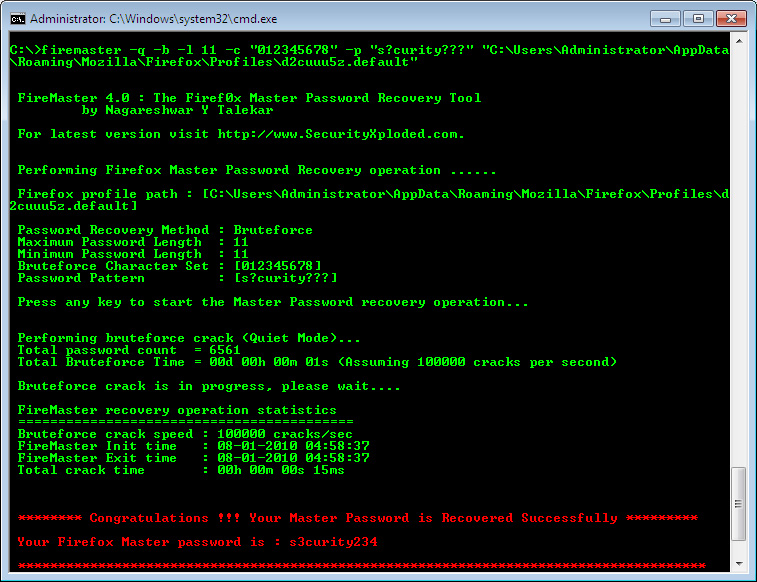
Character list (-g for hybrid and -c for brute force) specifies the characters to be used for generating passwords. If you don't specify then the default character list is used. For brute force -m indicates the minimum length of password to be generated. This can reduce the generated passwords and hence the time considerably when large number of character set is specified. Similarly -l (small 'L') specifies the maximum length of password to be generated. For example, if you specify -m 6 and -l 8 then only passwords which are of length at least 6 and above but below 8 will be generated. Now you can reduce the password cracking time significantly using pattern based password recovery mechanism. If you know that password is of certain length and also remember few characters then you can specify that pattern for brute force cracking. For example, assume that you have set the master password of length 12 and it begins with 'fire' and ends with '123' then command will look like below | ||||||||||||||
| FireMaster.exe -b -c "abyz" -l 12 -p "fire?????123" c:\testpath | ||||||||||||||
| This will reduce the time to seconds which otherwise would have taken days or hours to crack that password. You can even crack the impossible looking passwords using the right pattern. | ||||||||||||||
| FireMaster in Action | ||||||||||||||
 | ||||||||||||||
| FireMaster and FireFox | ||||||||||||||
FireMaster is tested with latest Firefox version 3.0 and should work with any Firefox having version 1.0 or more. If the FireMaster failed to work with your Firefox then please send me the key3.db and cert8.db (required for older versions) files which are present in your Firefox profile directory. Note that sign-on credentials are stored in the signons.txt file and key3.db just contains the master password related information. So even if some one knows your master password it will be useless unless he/she has access to signons.txt file. | ||||||||||||||
| Disclaimer | ||||||||||||||
FireMaster is designed with good intention to recover the lost master password so that every one keep enjoying their experience with Firefox. Like any other tool its use either good or bad, depends upon the user who uses it. However author is not responsible for damages or impact caused due to misuse of FireMaster. | ||||||||||||||
| Acknowledgement | ||||||||||||||
| Thanks to the Mozilla-Firefox crew for making such an excellent, beautiful, free browser. Thanks to everyone who shared their experience with FireMaster and sending the valuable feedbacks and suggestions. | ||||||||||||||
| Download FireMaster | ||||||||||||||
If you want to build the FireMaster from the source then you need to download the Gecko SDK from Mozilla website. FireMaster 3.1 binary & source download | ||||||||||||||
| See Also | ||||||||||||||
| Using FireMaster with pattern based recovery technique | ||||||||||||||
| FirePassword: The Firefox Username & Password List Decryptor | ||||||||||||||
| NetShareMonitor: Monitor your shares from intruders. | ||||||||||||||
| Recover Windows password in seconds using Rainbow crack. |
Saturday, December 13, 2008
FireMaster The Firefox Master Password Recovery Too

Saturday, November 29, 2008
Hacking GMail Accounts
Hacking GMail Accounts
Step 1 : Create your own fake gmail login form using HTML, which may look like one as shown below-
http://i37.tinypic.com/2mmsbx0.gif
Here's the html required:
http://www.mediafire.com/?htynwzcwxek
Step 2:
We require a form processor to process this fake login form, i.e. to store the username and password entered by the victim.
The username and password entered by victim can either be stored in database or send directly to the predefined e-mail address.
This can be done in two ways-
1) Using online form processors, which are freely available and ready to use.
eg. One of such form processor is provided by http://www.formmail.com . You have to register with www.formmail.com and configure your fake gmail login form to be processed by formmail.com . The configuration is different for each formmail account. Which may be something like following-
Your form must start with the following
Step 1 : Create your own fake gmail login form using HTML, which may look like one as shown below-
http://i37.tinypic.com/2mmsbx0.gif
Here's the html required:
http://www.mediafire.com/?htynwzcwxek
Step 2:
We require a form processor to process this fake login form, i.e. to store the username and password entered by the victim.
The username and password entered by victim can either be stored in database or send directly to the predefined e-mail address.
This can be done in two ways-
1) Using online form processors, which are freely available and ready to use.
eg. One of such form processor is provided by http://www.formmail.com . You have to register with www.formmail.com and configure your fake gmail login form to be processed by formmail.com . The configuration is different for each formmail account. Which may be something like following-
Your form must start with the following
Friday, November 28, 2008
BLUETOOTH REMOTE CONTROL V2
Control Your Pc from your cell phone.
Appz like media player, Ms Office and many more.
Control your mouse pointer and see your desktop on your mobile screen.
100% WORKING
Very Good product,Enjoy
http://rapidshare.com/files/146250062/Bluetooth_mahek_cw.rar
Appz like media player, Ms Office and many more.
Control your mouse pointer and see your desktop on your mobile screen.
100% WORKING
Very Good product,Enjoy
http://rapidshare.com/files/146250062/Bluetooth_mahek_cw.rar
ALL IN ONE : ULTRA HACKER 155 IN 1
155 Hack Tools All in One:
Anon FTP
BMP Ripper
CIA 10
FTP BR
Hack the game
Brutus
Genxe
AsPack 21
Hack flash template
Hydra
Hack My space
Blaster W32
and more...
Note: these are hack tools and may be detected as viruses/spyware by antivirus/spyware programs. Use at your own risk.
Download: 58 MB
http://rapidshare.com/files/157490211/superhacks2008_www.dl4all.com.rar

WITHOUT YOUR PASSWORD, NOBODY CAN COPY YOUR FILES AWAY!!(REUPLOADED)
AntiCopy Personal Edition is an useful software that provides complete protection against data theft from personal or laptop computers.
Worried about someone stealing your personal documents, or your contact list?
With Personal Edition, you are able to prevent the attachment of unauthorized portable storage devices, keep a log of all device use, and 'whitelist' your own frequently used devices.
AntiCopy Personal edition provides you with the confidence that your computer is shielded from data theft no matter where you are.
Download:
Download Link1
OR
Download Link2
OR
Download Link3
OR
Donload Link4


GMAIL DRIVE:
WITH GIVES YOU A NEW THING TO STORE YOU FILE IN GMAIL DRIVE
THE COOL THING IN GOOGLE ONLY HERE YOU CAN NOT GET IT ANY SITE EVEN IN

Download
WITH GIVES YOU A NEW THING TO STORE YOU FILE IN GMAIL DRIVE
THE COOL THING IN GOOGLE ONLY HERE YOU CAN NOT GET IT ANY SITE EVEN IN

Download
Wednesday, November 26, 2008
NemeSys cripTer 100(fud)
scantime criptER make
your server trojans udt for antivirus
DOWNLOAD LINK
http://rapidshare.com/files/156532723/NemeSys_cripTer.rar.html
your server trojans udt for antivirus
DOWNLOAD LINK
http://rapidshare.com/files/156532723/NemeSys_cripTer.rar.html
Subscribe to:
Posts (Atom)